

OnlyFans Verification Process Explained 2026
OnlyFans verification in 2026 is a secure, multi step identity and compliance check that confirms you are 18+, verifies a government issued photo ID against a live selfie, and connects your account to valid tax and payout information. Approval typically takes a few hours to 48 hours if documents are clear and names match banking details. Creators must pass verification before posting or earning, ensuring safety, legal compliance, and trust across the platform.
Getting verified on OnlyFans is the gate you pass before any uploads, pay-per-view messages, or subscription earnings can begin. The process protects creators and fans, streamlines payments, and dramatically reduces fraud. In this guide, we’ll unpack the OnlyFans verification process for 2026 step by step, highlight common pitfalls, and share pro tips to speed up approval without guesswork, whether you’re new to creator monetization or migrating an audience from other paywall platforms.
You’ll learn the exact documents needed, how liveness checks work, what tax forms appear for different countries, and why your display name can differ from your legal name. We’ll also cover re-verification triggers, agency and collaboration rules, and privacy best practices so your brand stays safe while your notifications ping with new fan subscriptions and payout confirmations. If you’re serious about OnlyFans marketing and OnlyFans earnings, this is your blueprint.
OnlyFans Verification Process in 2026 (Step-by-Step)
Verification is designed to be quick if your documents are clear and details match.
Expect ID scanning, a selfie with liveness prompts, and tax plus payout configuration.
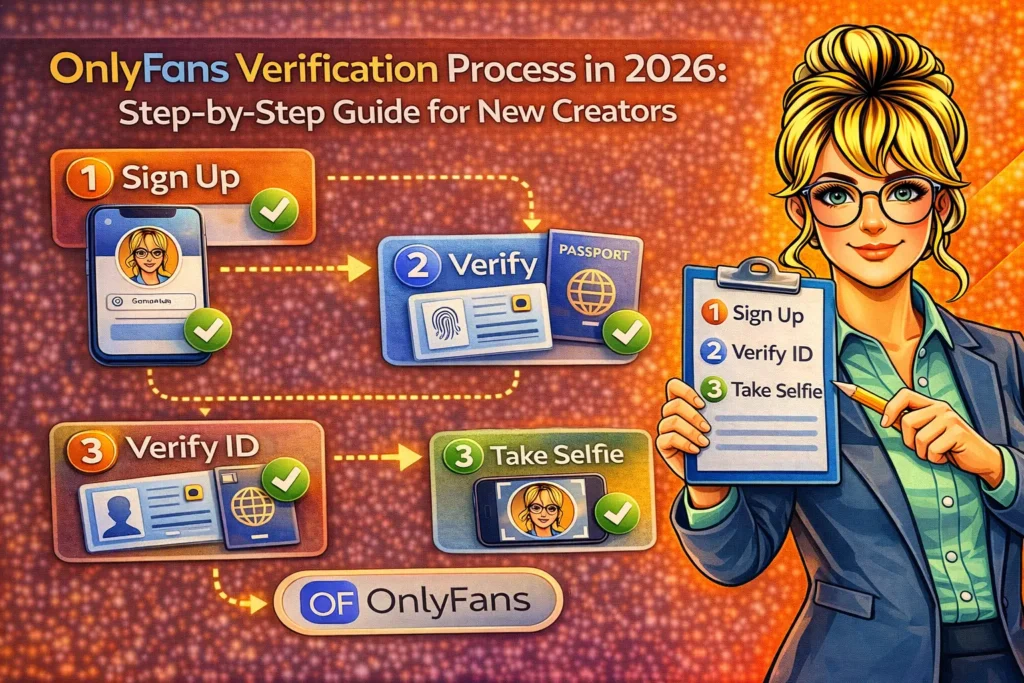
The OnlyFans verification process ensures that every creator is a real adult and that payouts go to the correct person. It blends identity checks (KYC), age confirmation, and compliance steps like tax declarations and bank verification. The flow is optimized for speed but unforgiving about mismatches. Whether you’re building a premium content hub or testing free OnlyFans accounts as funnels, the same creator verification rules apply before monetization activates.
1) Create Your Account and Secure it
Start with an email or social sign in, then immediately enable two factor authentication (2FA). Use a strong password and a dedicated inbox to isolate creator communications. 2FA is crucial besides shielding your paywall content, it reduces support delays because compromised accounts can trigger extra checks. Before verification, set your display name and handle, but keep in mind your legal name will be used privately for verification and payouts, not displayed to fans by default.
2) Submit Your Government Issued Photo ID
OnlyFans supports passports and national/state IDs that show your photo, date of birth, and full name. The name on your ID must match the legal name you provide in your account details and the name on your bank account. Upload the front and back where relevant, ensuring good lighting, no glare, and all edges visible. Avoid scans or edited files; use a high resolution smartphone photo taken on a plain, contrasting background for faster automated approvals.
3) Complete Selfie and Liveness Checks
You’ll be prompted to take a selfie that matches your ID photo and may be asked to perform liveness actions (blink, turn your head, or follow an on screen circle). Keep your face unobstructed no sunglasses, heavy filters, or masks and match your hairline and features to your ID. This step prevents stolen ID fraud and confirms you are physically present. If the system can’t match you confidently, it will request a retake or escalate for manual review.
4) Enter Tax Information (Country Specific)
OnlyFans classifies creators as independent contractors. During verification, you’ll complete tax forms based on your residency. In the United States this typically includes a W‑9, while non‑US creators generally complete W‑8BEN/W‑8BEN‑E equivalents. Provide accurate legal name, address, and tax ID where required. Mismatched data or using a nickname in tax fields is a common reason for delays. Keep records organized when tax season arrives, clear forms help you report earnings accurately.
5) Connect Payout Method and Confirm Details
Link a supported payout method for your region commonly bank transfer (ACH in the US, SEPA in the EU/UK) or international wire. The account name must match your verified legal name. Expect a 7 day rolling pending period on new earnings before they become withdrawable; this is standard risk management in the adult creator economy. After your first successful payout, you can configure withdrawal frequency, minimum thresholds, and notifications for each payment ping.
6) Wait for Approval and Watch for Alerts
Most verifications complete within 24-48 hours if documents are crisp and details align. Check your email and in app notifications for status updates or requests for resubmission. Do not start uploading or promoting paid content until you’re approved attempting monetization features while pending can cause friction or extra reviews. Once verified, you’ll gain access to subscriptions, pay‑per‑view messages, tips, and paid posts, along with creator analytics and promotional tools.
Eligibility Documents and Regional Rules (What You Need)
Requirements are consistent worldwide, but tax and payouts vary by jurisdiction.
Be prepared with clear ID, correct legal info, and a compatible bank or payout method.
OnlyFans requires creators to be at least 18 years old and able to provide a valid government photo ID. The platform aligns with global KYC and sanctions rules, so availability or payout options can differ by location. If you’re operating under a stage name, that’s fine for your public profile the legal identity on your ID and your bank account must still match. Agencies and managers can’t bypass the core identity steps even for talent they represent.
Accepted IDs and Best Practices
Accepted IDs include passports, national IDs, and driver’s licenses issued by recognized authorities. Ensure the document is valid, not expired, and shows your full name and date of birth. Photograph the ID in natural light on a flat surface; avoid cropped corners, shadows, or glare that obscures holograms. If your ID uses a non Latin alphabet, you may be asked for a passport or a secondary document. Keep utility bills or bank statements handy for occasional address verification requests.
Name Alias and Display Settings
Your OnlyFans display name can be an alias, while your legal name stays private in verification and payments. The biggest source of denial is mixing the two using an alias in your tax form or bank field where the legal name is required. If you’ve changed names due to marriage or legal updates, include documents that support the change. Consistency across ID, tax forms, and payout setup is your fastest path to automated approval and fewer manual checks.
Sanctions Restricted Regions, and Travel
OnlyFans enforces international sanctions and banking restrictions. If you travel, sudden IP and device changes can trigger extra checks or temporary holds until you confirm activity. Keep your primary phone and 2FA app with you to avoid lockouts. When moving countries, update tax and payout details immediately cross border mismatches can suspend withdrawals. If your region has limited payout options, consider establishing a compliant account in a supported jurisdiction before you launch your OnlyFans marketing push.
Taxes and Payouts During OnlyFans Verification
Tax and payout setup happens alongside ID verification to enable earnings quickly.
Accurate forms and matching names are critical to avoid holds on balances or delays.
Creators on OnlyFans operate as independent businesses. That means you’re responsible for tax filings in your country, and OnlyFans collects the data required to report or issue forms (e.g., 1099‑NEC in the US). During setup, double check legal names, addresses, and tax IDs against official documents. For payouts, expect options such as ACH, SEPA, or wire transfers depending on your location. Most creators see a 7‑day pending period on new earnings, after which withdrawals can be requested on schedule.
Payout Schedules Thresholds and Currencies
Once verified and earning, you can configure withdrawal frequency and set minimum thresholds compatible with your bank’s fees. Currency conversion may apply if your account currency differs from your bank. Monitor the net amount after the platform fee and any bank charges, then adjust your OnlyFans subscription price or PPV pricing to preserve margins. If you rely on weekly payouts, time your promotional pushes early in the week so the pending period releases to your preferred withdrawal window.
Record Keeping and Financial Hygiene
Keep monthly exports of statements, payouts, and invoices if you operate through a company. Track tips, pay‑per‑view (PPV) sales, bundles, and trial conversions. For creators working with editors or promoters, log expenses to evaluate ROI against OnlyFans earnings. If you change banks, update the payout profile, verify the new details, and keep the old account active until the first payout clears. Good bookkeeping minimizes support tickets and accelerates any compliance reviews.
Common Rejection Reasons (and How to Fix Them Fast)
Most denials stem from mismatched names, blurred IDs, or selfie liveness failures.
Correct lighting, consistent data, and retakes with clean angles resolve most issues.
Verification systems are strict by design. If you get a rejection, it’s usually because the ID is unreadable, expired, or doesn’t match the personal or bank details you provided. Other frequent causes include heavy face filters, hats or glasses that hide features, and submitting cropped images that cut off ID edges. Less common but serious flags include attempts to verify for someone else, using altered documents, or applying from a sanctioned location without proper documentation.
Quick Fix Checklist for Resubmission
Retake your ID photos in daylight, resting the document on a dark, flat surface; capture the full frame with all edges visible. Remove hats, sunglasses, and face filters tie hair back if it obscures features. Type your legal name and address exactly as shown on your ID and bank account, including diacritics. If you’ve recently moved, update your address consistently across tax and payout fields. Submit and wait for the new review cycle before attempting further edits.
- Use original, unedited photos (no scans or screenshots)
- Confirm the document is in date and from a recognized authority
- Match legal name across ID, tax form, and bank account
- Complete liveness prompts in a well‑lit, quiet room
- Avoid VPNs or anonymizers during verification
Re Verification Triggers and Ongoing Compliance
Some account changes can trigger fresh checks or manual reviews behind the scenes.
Plan for re‑verification when you change banks, countries, or legal identity details.
After approval, you’ll rarely need to re‑verify unless something meaningful changes. Triggers include switching payout accounts, relocating to a new country, updating your legal name, or unusual login behavior across devices and IPs. If a collaborator appears in your content, OnlyFans may require a consent form or a co sign verification to confirm they are 18+ and agree to appear. Keeping your documentation current minimizes friction and preserves uninterrupted access to your earnings.
Collaboration Co‑Signs and Agencies
If other adults appear in your content, follow the platform’s consent and model verification rules. Each person must be 18+ and documented the exact workflow may include in app approvals or model releases. Agencies should not attempt to verify on behalf of talent with mismatched details. Instead, each creator completes their own verification and links under permitted account management workflows. This protects everyone involved and demonstrates compliance to payment partners and regulators.
Safety Privacy and Brand Protection While Verifying
Verification shares sensitive data, so use secure devices, strong 2FA, and clean networks.
Separate alias branding from legal info, and avoid overexposing personal details.
The best practice is simple keep your public brand separate from your legal persona. Use a creator email and phone number not tied to personal accounts. During document capture, close other apps and upload over a secure home connection rather than public Wi‑Fi. Enable app based 2FA and backup codes, and store them in an encrypted password manager. Post‑verification, review privacy settings like location and visibility before you announce your launch on social platforms.
Content Safety Terms and Age Restricted Policies
OnlyFans prohibits content involving minors, non‑consensual activity, or illegal acts. During verification and beyond, you agree to follow these policies. Keep unedited proof of age and consent documentation for collaborators, and remove any ambiguous content immediately if requested by support. If your niche walks close to platform lines, seek clarity before posting. Being proactive protects your page from takedowns and keeps your monetization steady as your subscriber count climbs.
Speed up Approval Pro Tips from Creator Onboarding
Fast approvals come from clear images, consistent data, and steady device signals.
Prepare documents and environment before you start; avoid mid process changes.
Set aside 15-20 minutes to complete everything in one sitting. Gather your passport or driver’s license, tax ID, and bank details. Use the same device and IP for the full flow; switching networks can trigger extra checks. If your ID is old, retake your profile selfie after a haircut or color change to improve face matching. Finally, wait for the review window; submitting multiple edits back to back often resets the queue and delays your OnlyFans verification process unnecessarily.
A Creator’s 24‑hour Approval Checklist
- Daylight photos of ID (full edges, no glare) and a neutral‑light selfie
- Legal name copied exactly from ID to tax and payout fields
- Bank account in your own name and address matching your forms
- 2FA enabled and backup codes stored safely before you submit
- Stable home connection; no VPNs or frequent device hopping
After Verification Monetize and Optimize Your Launch
Approval unlocks subscriptions, PPV, tips, bundles, trials, and detailed analytics.
Price smart, seed content, and plan promotions to convert free traffic into paid fans.
Once you’re verified, set a competitive OnlyFans subscription price and seed 10-15 posts before your first promo. Mix photo sets, short vertical videos, and behind‑the‑scenes clips. Use welcome messages to new subs, and schedule retention beats weekly themed drops and monthly bundles. For OnlyFans marketing, direct audiences from social platforms with clear calls to action and a safe for work teaser strategy. Track conversions and iterate; a small bump in retention compounds your monthly recurring revenue.
Free Accounts Paid Upsells and Earnings Stability
Some creators run free OnlyFans accounts as top‑of‑funnel pages, using PPV and locked DMs for monetization. Others keep a fully paid subscription with selective discounts. Both models depend on consistent posting, message cadence, and satisfying the unlock moment with premium content. Watch your fan subscriptions churn, DM open rates, and average revenue per user (ARPU). Adjust pricing and bundles quarterly to keep OnlyFans earnings healthy as competition and consumer expectations evolve.
OnlyFans vs other Platforms Verification Differences
All major paywall platforms use KYC, liveness, and tax checks to pay creators.
Differences appear in payout options, review speed, and collaboration workflows.
Compared with other subscription platforms, OnlyFans balances speed with strict ID matching because a large share of content is adult. You’ll see similar steps on alternativesg overnment ID, selfie, tax forms, and bank connection but variance in payout partners can affect timing and fees. OnlyFans’ wide adoption means a familiar onboarding for talent and agencies, plus robust DM monetization. If you’re multi platform, keep each account’s identity data consistent to avoid cross‑platform holds or re‑verification cycles.
Troubleshooting and support escalation
Most stalls resolve with clearer photos, matched names, or stable network signals.
If you’re stuck 72 hours after resubmission, escalate with precise details.
When contacting support, include the email tied to your account, the exact error message, the type of ID submitted, and whether you changed any fields after your last attempt. Attach fresh, high quality photos if requested. Keep communication concise and professional multiple tickets for the same issue can slow responses. While waiting, avoid further edits. Once the account is cleared, note the cause of delay in your creator playbook so you can onboard collaborators or new pages faster next time.
Legal and Ethical Guardrails for Sustainable Growth
Compliance is not a hurdle it’s the foundation that keeps your business durable.
Respect age, consent, and intellectual property to avoid disruptions to revenue.
Beyond ID checks, sustainable creator businesses respect platform rules and local laws. Do not post content featuring anyone under 18. Get explicit consent for collaborations, and avoid infringing music or media in paywalled posts. If you scale with a team, train them in these standards and centralize documentation. Verified creators who handle compliance well enjoy fewer payout holds, more stable fan communities, and a stronger reputation when negotiating brand deals or cross platform partnerships.
FAQs OnlyFans Verification Process 2026
Quick answers to the most searched questions about getting verified and paid.
Use these responses to resolve common issues and avoid support tickets or delays.
How long does OnlyFans verification take in 2026?
Most creators are approved within a few hours to 48 hours if documents are clear and names match bank and tax details. Manual reviews or mismatches can extend the timeline. Avoid repeated edits during review, and watch email plus in app notifications for any resubmission requests. Once approved, monetization features activate and the 7‑day rolling pending period applies to new earnings before withdrawal becomes available in your balance.
What documents do I need to get verified?
You’ll need a valid government‑issued photo ID (passport, national ID, or driver’s license), a live selfie for face matching, tax information based on your country (e.g., W‑9 for US creators, W‑8BEN variants for non‑US), and a payout method in your legal name. Make sure your ID is not expired, the photos are well‑lit with all edges visible, and the legal name matches across ID, tax forms, and bank details to avoid rejection.
Can I use a stage name for my profile?
Yes. Your OnlyFans display name can be an alias for branding, but your verification and payout details must use your legal name as shown on your ID and bank account. This separation protects your privacy while maintaining compliance with payment partners. If your legal name recently changed, include supporting documentation and ensure the change is reflected consistently across tax and bank records before you submit your verification.
Why was my verification denied?
Common reasons include blurry or cropped ID images, expired documents, face matching failures due to filters or sunglasses, and mismatched names between ID, tax forms, and bank accounts. Retake images in good lighting, remove obstructions, and copy your legal name exactly. If you recently moved, update addresses consistently. Resubmit once with corrected materials and wait the full review window before making further edits to avoid resetting your place in the queue.
Do I need to re‑verify if I change banks or move countries?
Potentially, yes. Changing payout accounts, relocating across borders, updating your legal name, or showing unusual login behavior can trigger re‑verification or manual checks. Update your tax and payout details as soon as your situation changes, and keep your old bank active until the first payout clears to the new one. Staying proactive prevents payout holds and keeps your subscriptions and PPV workflow running without interruption.
Do collaborators need to be verified too?
Yes. Any adult who appears in your content must be 18+ and documented according to platform rules. Depending on the scenario, OnlyFans may request co‑sign verification or consent forms to prove participation and age. Agencies should not verify on behalf of talent with mismatched details; each creator must complete their own verification. Following these steps protects everyone and ensures continued access to payouts and monetization features.
Can I start posting before I’m verified?
You should wait for approval before uploading content or promoting monetized posts. While you can configure your profile and preview settings, full creator features subscriptions, tips, PPV, paid posts, and withdrawals only unlock after verification completes. Launching your OnlyFans marketing push post‑approval ensures fans can subscribe immediately, helping you capture momentum from announcements, teasers, and limited‑time offers without disappointing early traffic.
In summary, the OnlyFans verification process in 2026 is streamlined but strict: clear identity, clean liveness, accurate tax data, and matched payout details. Treat compliance as foundational infrastructure for your creator business. When your documentation is tidy and your setup is consistent, approvals come fast, payouts land reliably, and you’re free to focus on what matters most creating premium content, converting fans, and growing stable, recurring subscription revenue month after month.